
Cassette Deck
You already know
how to trade.
We just put more
within reach.
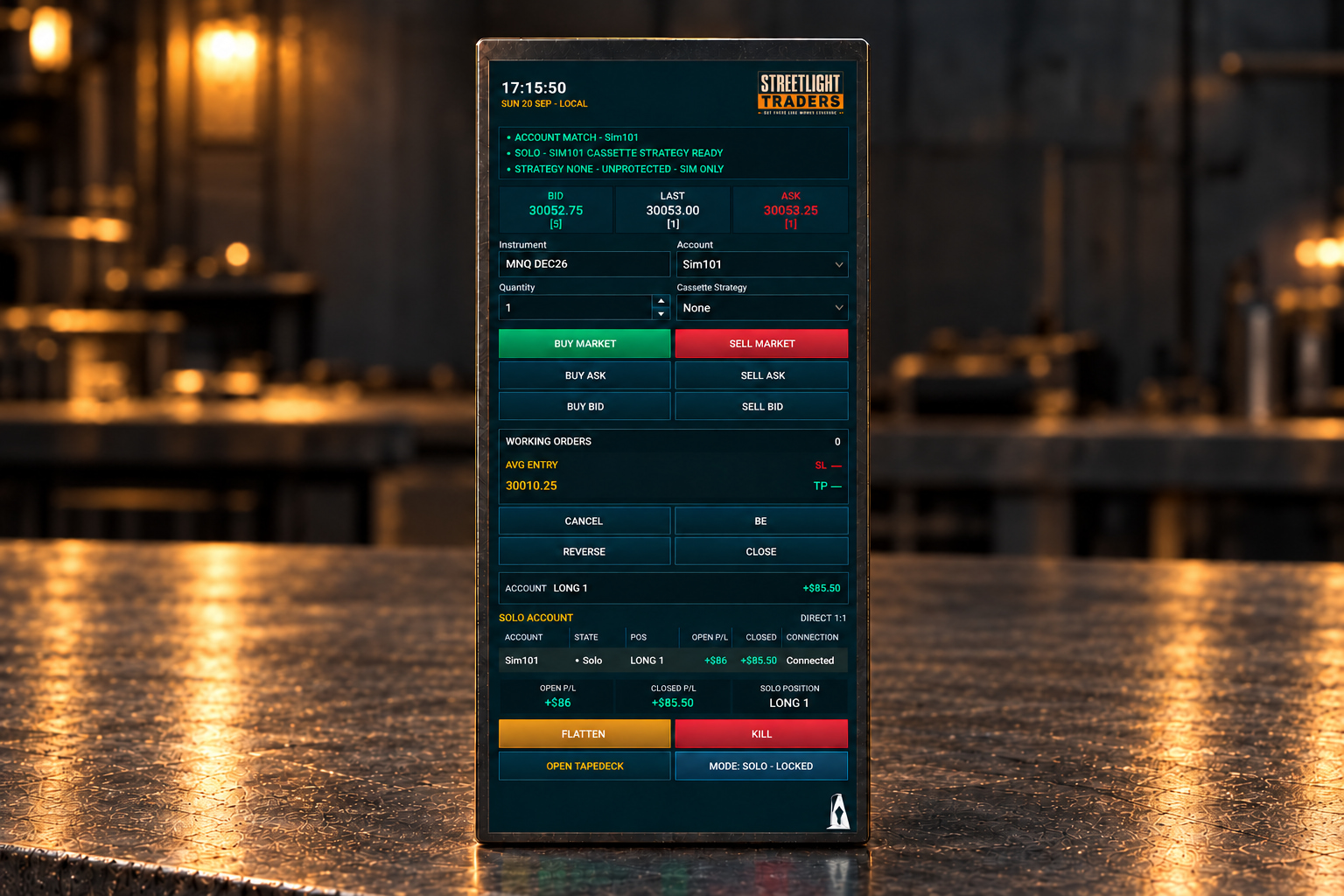
Cassette Deck is a visual order-management workspace for NinjaTrader Desktop, built around the familiar trading workflow you already use — with additional entry, position-management and protection controls close at hand.
It was designed to work alongside TapeDeck, giving you dedicated order management while TapeDeck handles follower synchronization. Used on its own, Cassette gives you the same focused controls for the selected trading account.

Your trade.
Your decision.
Your responsibility.
Cassette Deck gives you faster access to order-entry and position-management controls. It does not decide when to enter, where to exit or how much risk to take.
Cassette provides the controls. The trading decisions remain yours.
More than entry.
NinjaTrader already provides the foundation. Cassette brings the controls we use most into one focused workspace.
Enter at market, bid or ask. Manage working orders. Cancel, break even, reverse or close. Flatten the selected account’s current instrument or use KILL when you need an emergency exit.
Set your protection before the trade.
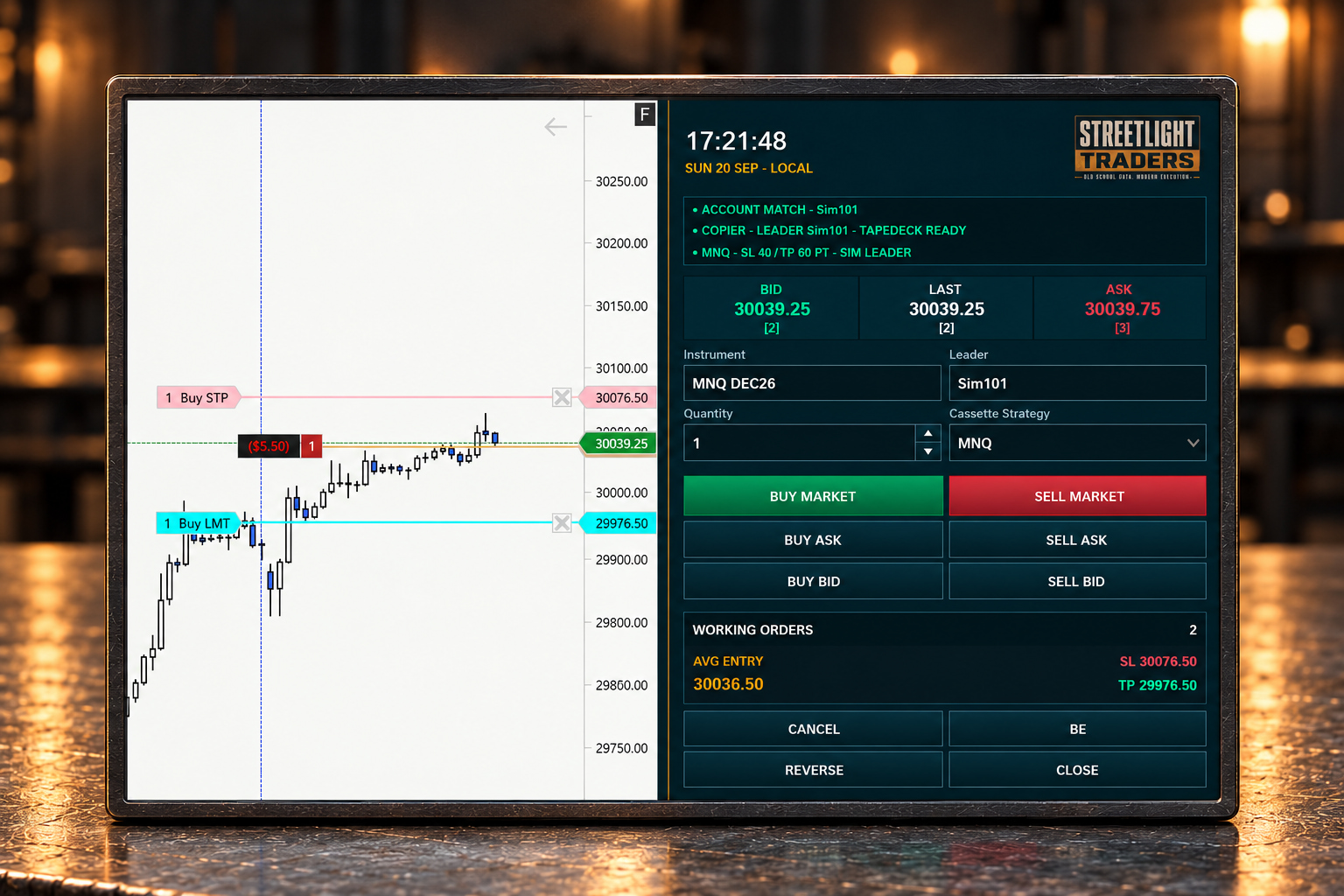
Choose a Cassette Strategy and define your stop and target in ticks, points or dollars. When the protected entry fills, Cassette applies its owned OCO protection. Prefer to manage visually? Your eligible protection can still be adjusted directly on the chart. An externally created ATM retains its own order sizes: changing the position outside that ATM does not necessarily resize its stops or targets. Verify actual exposure and protection after scaling.
Works with the NinjaTrader workflow
you already know.
Cassette Deck works directly with the selected NinjaTrader account and chart. Account and quantity stay synchronized with Chart Trader, while Cassette provides its own order-entry and position-management controls.
Entry controls
Enter the trade.
Your way.
The trader chooses the account, quantity and order action. Cassette does not choose direction, timing or size.
- BUY MARKET · SELL MARKET
- Submit a market entry in the direction you choose.
- BUY ASK · SELL ASK
- Submit a limit order at the current ask.
- BUY BID · SELL BID
- Submit a limit order at the current bid.
You opened it.
Now manage it.
- CANCEL
- Cancel working orders for the selected account and instrument without closing the position.
- BE
- Move an eligible Cassette-owned stop to break even.
- REVERSE
- Close an eligible managed position and request an entry in the opposite direction.
- CLOSE
- Close an eligible managed position.
Know what
you’re trading.
Cassette keeps relevant account, instrument, quantity, position, working-order and P&L context visible while the trader manages the position. See the account state and the controls together, without losing sight of what you’re managing.
Your account.
Your position.
Your controls.
Cassette acts on the selected account and current chart instrument. Verify the correct account and instrument before you act. The position and its risk remain your responsibility.
Built for
the chart.
Cassette is intended to live alongside the NinjaTrader chart rather than replace it. Keep the market visible and the controls nearby.
The actual product
One compact
trading workspace.
Account. Instrument. Quantity. Entry. Position state. Working orders. Protection. Emergency controls.
Everything visible. Everything close at hand.
When you need out,
you need out.
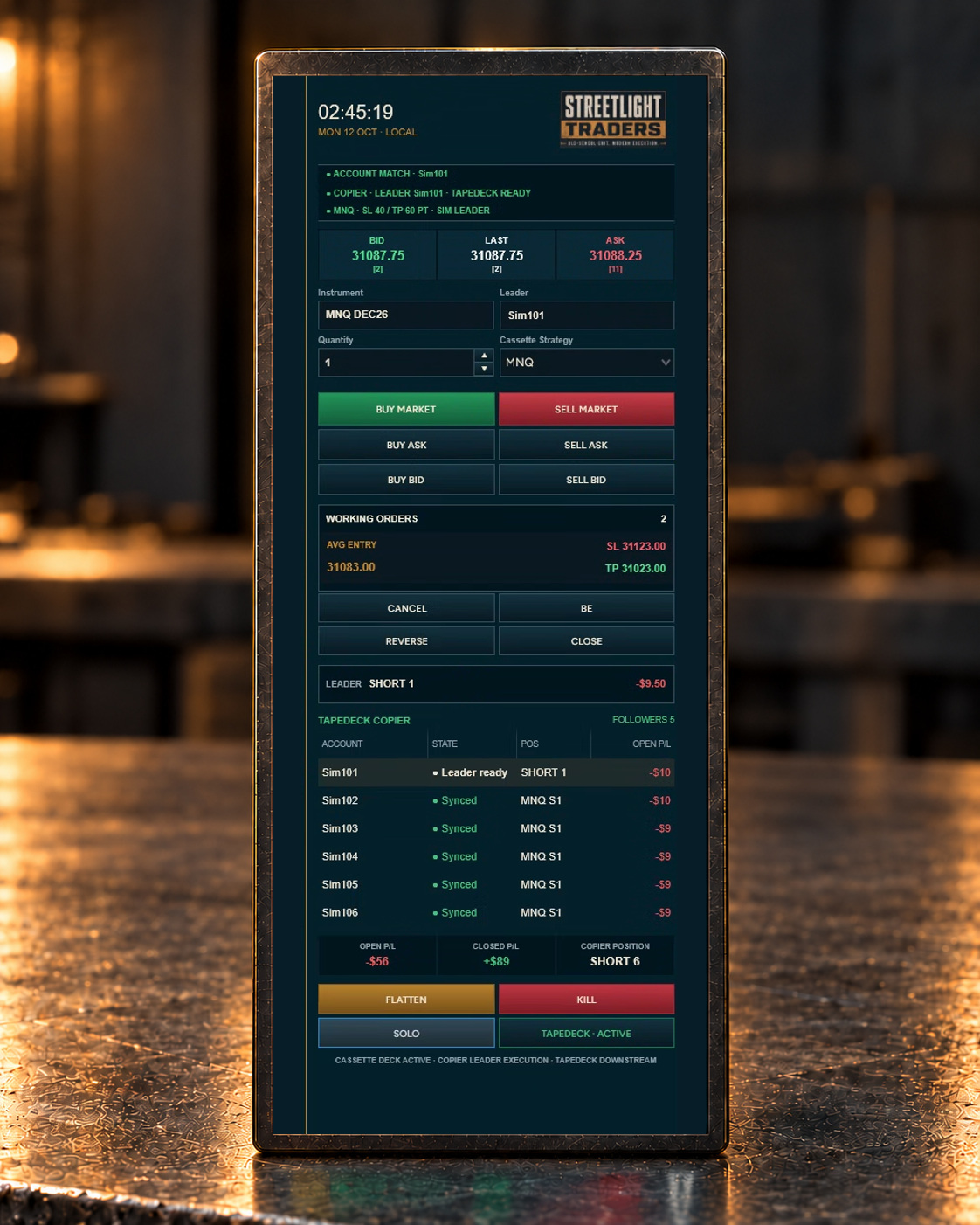
FLATTEN provides a deliberate exit for the selected account and current instrument when you want out. KILL requests scoped emergency cleanup and latches new Cassette entries off. Once the scope is verified clean, deliberate two-step rearm restores operation; the confirmation expires after five seconds. Verify native Orders and Positions after any cleanup request.
Already in
the trade?
In SOLO mode, Cassette can recognize eligible existing positions and provide supported management controls under its ownership and inventory safeguards. External orders do not automatically become Cassette-owned protection. In TAPEDECK mode, an external SuperDOM entry may show OWNERSHIP LOCK — FLATTEN TO RESUME; TapeDeck can continue following confirmed Leader executions independently. Learn the ownership-recovery workflow.
Copy more than one account?
Meet TapeDeck.
Trade with Cassette.
Synchronize with TapeDeck.
In SOLO mode, Cassette manages the selected trading account directly. In TAPEDECK mode, Cassette operates the TapeDeck Leader while TapeDeck synchronizes the confirmed position across the armed Followers.
Two focused tools. Designed to work together. Cassette FLATTEN does not restart TapeDeck, and TapeDeck suspension does not automatically create a Cassette ownership lock.
Meet TapeDeck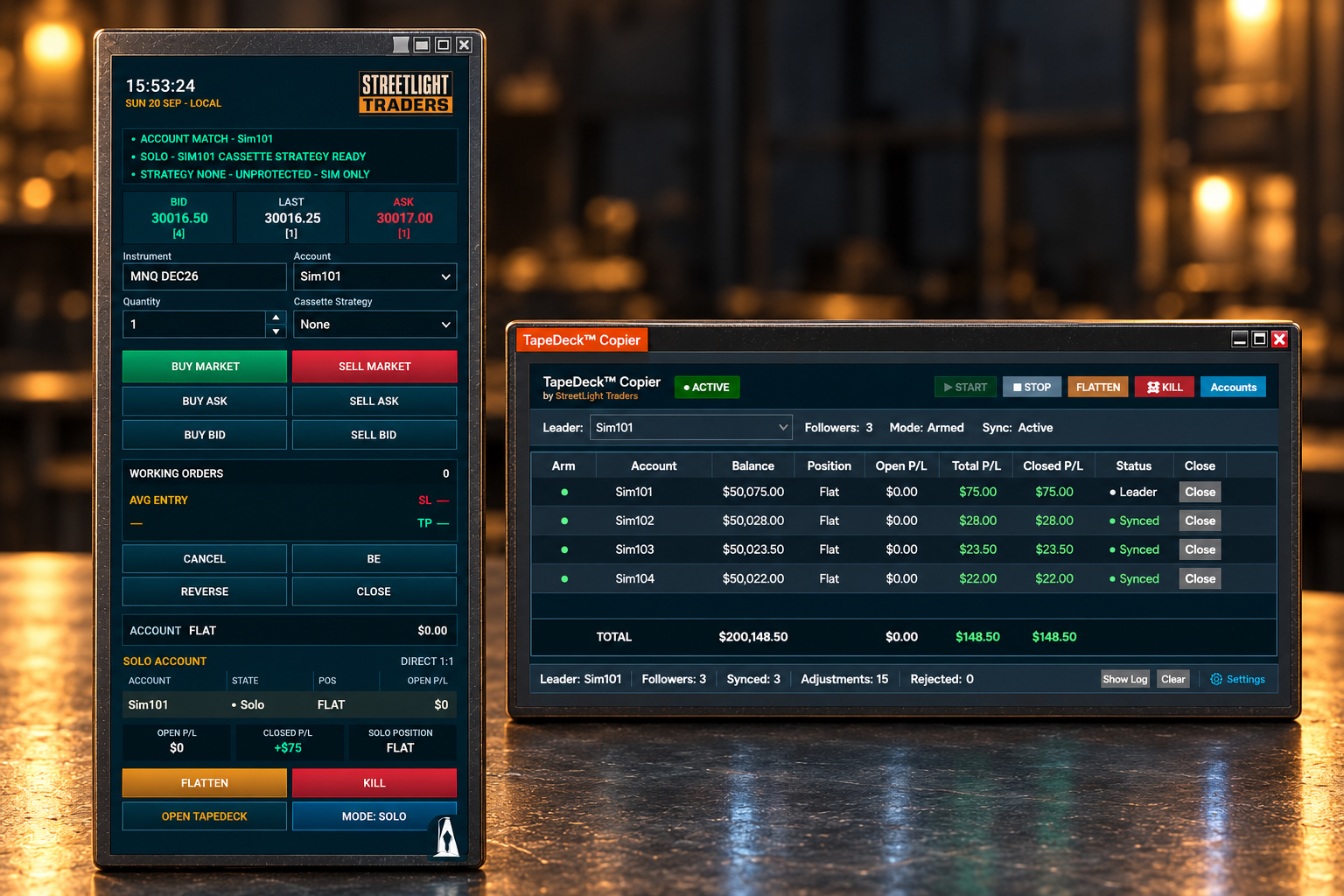
Know what Cassette Deck is —
and what it isn’t.
Cassette Deck is not a trading strategy, signal service or automated trade-decision system. It does not decide when to trade, guarantee profitable results or remove the risks associated with trading.
Cassette Deck is an order-management tool. You make the trading decisions.
Cassette Deck
$89USD · one-time purchase
One edition
No subscription. No required renewal.*
Standard Bundle
$129USD · one-time purchase
TapeDeck Standard + Cassette Deck
1 Leader + up to 5 Followers
No subscription. No required renewal.* Save $39
Pro Bundle
$169USD · one-time purchase
TapeDeck Pro + Cassette Deck
1 Leader + up to 10 Followers
No subscription. No required renewal.* Save $49
After purchase, StreetLight Traders will email your software download instructions and arrange activation of your NinjaTrader licence.
*One-time purchase includes 12 months of product updates and standard support. Your purchased license does not expire when the included update and support period ends. Future major product generations, compatibility upgrades, or extended support may be offered separately.
Start in SIM.
Learn it first.
New to Cassette Deck? Start here.
Start in SIM and learn the controls before using Cassette Deck with funded or live accounts.